
Introduction
Wow I never thought the day I stop using VS Code would come so soon…
But the new Windsurf IDE blows VS Code out of the water — now I've cancelled my GitHub Copilot subscription and made it my main IDE.
And you know, when they said it was an "Agentic IDE" I was rolling my eyes at first because of all the previous hype with agents like AutoGPT.
But Windsurf shocked me.
What Makes Windsurf Different
These agentic tools are going to transform coding for sure — and not necessarily for the better — at least from the POV of software devs 😅
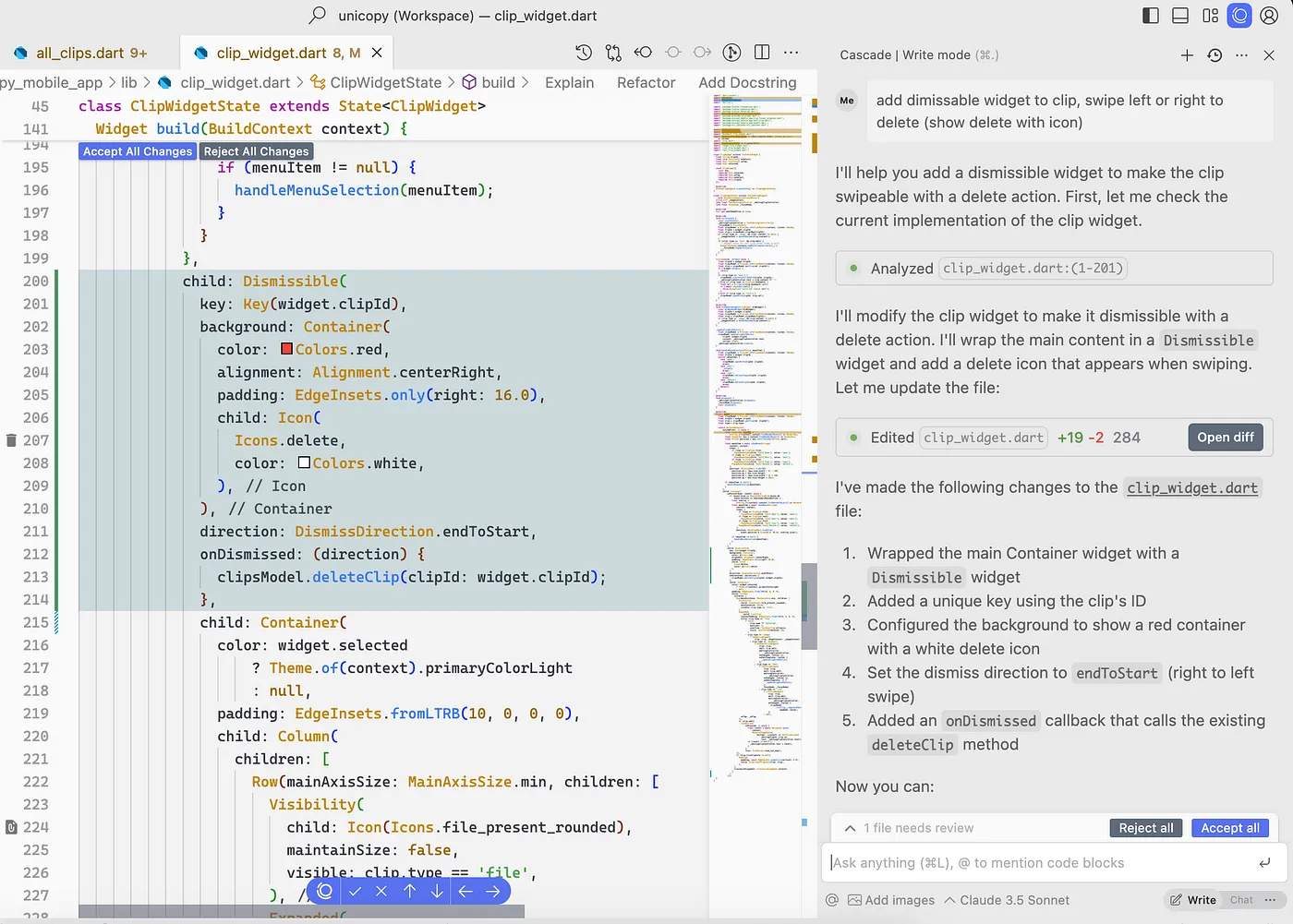
The agent actually makes useful changes to my code, and my prompt didn't have to be so low-level. They call it Cascade and it saves so much time.
Unlike traditional IDEs that simply provide an environment for you to write code, Windsurf actively participates in the development process. It's not just a passive tool waiting for your input — it's an intelligent partner that understands your codebase and can make meaningful contributions.
What sets Windsurf apart is its ability to understand context across multiple files and make coordinated changes that maintain consistency throughout your project. This goes far beyond what VS Code with GitHub Copilot can currently offer.
Cascade: The Game-Changing Feature
You see how it analyzes several areas in my code to make the changes — and this analysis can include many many files in your codebase.
And same for the changes — it's doing the coding for you now.
Cascade is Windsurf's flagship feature, and it's what truly sets it apart from other IDEs. Here's what makes it special:
Multi-file awareness: Unlike Copilot, which primarily focuses on the current file, Cascade can analyze and modify code across your entire project.
Contextual understanding: It doesn't just pattern-match; it actually understands the relationships between different parts of your codebase.
Coordinated changes: When you request a change, Cascade identifies all the related code that needs to be updated and makes those changes consistently.
Intelligent refactoring: It can perform complex refactoring operations that would typically require multiple manual steps in VS Code.
The most impressive part is how Cascade maintains the integrity of your codebase while making these changes. It's not just blindly applying transformations — it's carefully considering the implications of each modification.
Time-Saving Features
Save tons of time by telling it to write your commit messages for you:
Windsurf doesn't just help you write code — it also streamlines your entire development workflow. Here are some of the time-saving features that have made me more productive:
Automatic commit message generation: Windsurf analyzes your changes and generates meaningful, descriptive commit messages that follow best practices.
Code completions: Just like Copilot it gives you code completions — that's just expected at this point — and they're free.
Integrated documentation: Windsurf can automatically generate and update documentation based on your code changes.
Smart debugging: It doesn't just highlight errors; it suggests specific fixes and can even implement them for you.
These features alone would make Windsurf a compelling alternative to VS Code, but it's the next feature that truly elevates it to another level.
Supercomplete: Beyond Basic Code Completion
But it goes way beyond that with Supercomplete — an incredible feature that predicts not just your next line, but your next intent.
Probably inspired by a similar feature in the Cursor IDE.
It doesn't just complete your code where the cursor is, it completes your high-level action. It "thinks" at a higher level of abstraction.
Supercomplete is where Windsurf's AI capabilities really shine. While GitHub Copilot is good at suggesting the next line of code, Supercomplete understands what you're trying to accomplish and helps you complete entire tasks. Here's how it works:
Intent recognition: Windsurf analyzes what you're currently doing and predicts your overall goal.
Task completion: Rather than just suggesting the next line, it can implement entire features or functions.
Contextual awareness: It considers your project's architecture, coding standards, and patterns when making suggestions.
Learning from your style: The more you use it, the better it gets at predicting your specific coding patterns and preferences.
Practical Examples
Like when you rename a variable it'll automatically know you want to do the same for all the other references.
And not just for one variable but multiple logically related ones — which goes beyond the "rename variable" function that editors like VS Code have.
When you update a schema in your code, it'll automatically update all the places that use it — and not just in the same file.
And how about binding to event handlers in a framework like React? Doing it for you after you create the variable?
Let me share some specific examples of how Windsurf has improved my workflow:
Intelligent variable renaming: When I renamed a model property in a React project, Windsurf automatically updated all references across components, tests, and even documentation files.
Schema propagation: After modifying a database schema, Windsurf identified and updated all the affected queries, models, and UI components that relied on that schema.
Framework-aware coding: When working with React, Windsurf understood component lifecycle methods and suggested appropriate implementations based on my specific use case.
API integration: After defining an API endpoint, Windsurf helped implement the client-side code to consume that API, including error handling and data transformation.
These examples demonstrate how Windsurf operates at a higher level of abstraction than traditional IDEs, focusing on your intent rather than just the code itself.
The Evolution of AI Coding Tools
You see how AI continues to handle more and more coding tasks with increasing levels of complexity and abstraction.
We got the low-level of code completions…
Then we got higher-level action completions with Cursor and this Windsurf Supercomplete stuff.
Now we're starting to have full-blown agents to handle much more advanced programming tasks.
And these agents will only continue to get better.
How long until they completely take over the entire coding process?
And then the entire software development life cycle?
The progression of AI coding tools has been fascinating to watch:
First wave (2020-2022): Basic code completion tools that could suggest the next line based on what you've already written.
Second wave (2022-2023): More sophisticated tools like GitHub Copilot that could generate entire functions based on comments or function signatures.
Third wave (2023-2024): Tools like Cursor that began to understand intent and could complete higher-level actions.
Fourth wave (2024-present): Agentic IDEs like Windsurf that can understand and modify entire codebases with minimal guidance.
This evolution raises important questions about the future of software development. Will developers become more like architects, focusing on high-level design while AI handles the implementation details? Or will the role of developers fundamentally change in ways we can't yet predict?
The Future of Software Development
You know, some people say the hardest part of software development is getting total clarity from the user on what they want.
They say coding is easy but other parts of the software dev process like this initial requirements stage is hard and AI won't be able to do it.
But this is mostly cope.
Telling an AI exactly what you want is not all that different from telling a human what you want. It's mostly a matter of avoiding ambiguity using context or asking for more specificity — with like more detailed prompts.
AI agents are rapidly improving and will be able to autonomously resolve this lack of clarity with multi-step prompting.
Now we're seeing what tools like Windsurf and Cursor Composer can do.
As AI coding tools continue to evolve, we're likely to see changes in how software is developed:
Shift in developer skills: The most valuable skills may shift from writing code to effectively communicating with AI systems and understanding system architecture.
Democratization of development: More people without traditional coding backgrounds may be able to create software by leveraging these AI tools.
Focus on creativity and problem-solving: Developers may spend less time on implementation details and more time on creative problem-solving and user experience design.
New quality assurance challenges: As AI generates more code, ensuring its quality, security, and maintainability will become increasingly important.
While some developers worry about being replaced, I think it's more likely that the role will evolve. The most successful developers will be those who learn to effectively collaborate with these AI systems, using them to enhance their capabilities rather than replace them.
Getting Started with Windsurf
So, how to get started with Windsurf?
Windsurf comes from the same people that made that free Codeium extension for VS Code, so you'll get it at codeium.com
And there's a pretty good free version, but it won't give you all the unique features that really make this IDE stand out.
You only get a limited free trial at the agentic Cascade feature — you'll have to upgrade to at least Pro to really make the most of it.
Before the Pro price was $10 per month for unlimited Cascade use, but developers used it so much that they had to set limits with a higher price and introduce a pay-as-you-go system.
If you're interested in trying Windsurf, here's what you need to know:
Installation: You can download Windsurf from codeium.com. It's available for Windows, macOS, and Linux.
Free tier: The free version includes basic code completion features and limited access to Cascade.
Pro tier: For $15/month, you get unlimited access to Cascade and Supercomplete, along with priority support.
Enterprise tier: For larger teams, there's an enterprise option with additional features for collaboration and security.
Learning curve: Despite its advanced capabilities, Windsurf has a surprisingly gentle learning curve, especially if you're already familiar with VS Code.
I recommend starting with the free tier to get a feel for the interface, then upgrading to Pro once you've experienced the benefits of the agentic features.
Developer Tools to Enhance Your Windsurf Experience
When working with Windsurf IDE, you might find these free tools from 1tool.dev helpful:
JSON Formatter: Perfect for working with Windsurf's configuration files and API responses. This tool helps you format and validate JSON data, making it easier to customize your Windsurf environment.
Regex Tester: When you're creating complex search patterns for your codebase, our Regex Tester can help you validate your expressions before using them in Windsurf.
HTML Prettify: For web developers, this tool complements Windsurf by helping you format and beautify HTML code, making it more readable and maintainable.
Base64 Encoder/Decoder: Useful when working with encoded data in your development projects, this tool can save you time when dealing with authentication tokens or encoded assets.
These tools can complement your Windsurf workflow, especially for specific tasks that might be faster to perform in a dedicated tool rather than within the IDE itself.
Conclusion
Eventually coding is going to change forever as we know it. And software developers are only going to have to adapt.
Windsurf represents a significant leap forward in the evolution of development environments. By moving from passive tools to active, intelligent agents, it's changing how we think about writing code.
While there are legitimate concerns about the impact of these tools on the job market for developers, I believe they ultimately represent an opportunity rather than a threat. By embracing these new technologies and learning to work effectively with them, developers can become more productive and focus on the most creative and fulfilling aspects of software development.
Whether Windsurf itself becomes the dominant IDE or is eventually surpassed by something even more advanced, one thing is clear: the future of coding involves much closer collaboration between humans and AI. And that future is arriving faster than many of us expected.
FAQs About Windsurf IDE
Is Windsurf suitable for beginners?
While Windsurf can be used by beginners, it's most beneficial for developers who already have some coding experience. The AI features can sometimes generate complex code that might be overwhelming for complete beginners.
How does Windsurf handle different programming languages?
Windsurf supports most major programming languages, with particularly strong support for JavaScript/TypeScript, Python, Java, C#, and Go. Support for other languages is continuously improving.
Can Windsurf work with my existing projects?
Yes, Windsurf can open and work with existing projects from VS Code or other IDEs. It includes importers to help migrate settings and extensions from VS Code.
Does Windsurf require an internet connection?
Yes, the AI features of Windsurf require an internet connection to function. However, basic editing capabilities work offline.
How secure is my code with Windsurf?
Windsurf takes security seriously. Code is encrypted in transit, and you can configure the tool to avoid sending sensitive parts of your codebase to their servers. Enterprise plans include additional security features.
Can Windsurf integrate with version control systems?
Yes, Windsurf has built-in support for Git and can integrate with GitHub, GitLab, and Bitbucket. Its commit message generation feature works with all of these systems.
How does Windsurf compare to other AI coding tools like Cursor?
While both Windsurf and Cursor offer AI-enhanced coding experiences, Windsurf's Cascade feature provides more comprehensive codebase-wide changes. Cursor excels at chat-based interactions, while Windsurf focuses more on autonomous code modifications.